
ProdRoads documentation
Line visibility
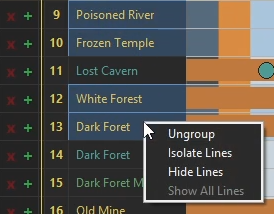
Select one or more lines, then right-click to manage their visibility.
| Action | Result |
|---|---|
| Isolate Line/Lines | Keep only the selected lines visible |
| Hide Line/Lines | Remove the selected lines from the current view |
| Show All Lines | Restore hidden and isolated lines |
Per Topic, Per People, and Time Summary keep independent visibility states. In Per People, isolation takes priority over the visible-team selection.
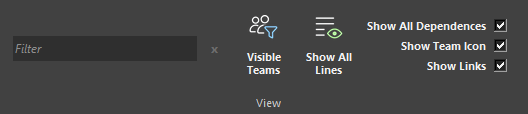
Where to find it
See it in action
The example below hides and isolates selected lines, then uses Show All Lines to restore the complete roadmap.
Tip
When one or more lines are hidden, the Show All Lines icon turns orange to indicate that some lines are not currently visible.