
ProdRoads documentation
Calendar display
The calendar header keeps the production period readable while the roadmap scrolls.
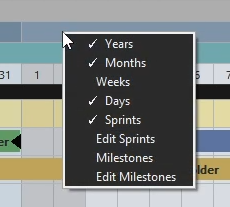
It can display years, months, weeks, days, key dates, sprints, and milestones. Right-click a calendar row to choose which period rows are visible.
Calendar labels stay pinned to the visible edge of the timeline when their period extends beyond the current viewport.
Where to find it
See it in action
The example below uses the calendar context menu to show or hide period rows while keeping the roadmap content unchanged.
Visual date markers
Weekends, holidays, past dates, the current day, and key dates use distinct colors. The selected language determines the holiday calendar used by ProdRoads.
| Marker | Color | Meaning |
|---|---|---|
| Weekend or holiday | or | Non-working day |
| Past date | Time that is no longer available | |
| Current day | Today’s position in the plan | |
| Key date | Review, delivery, approval, or production gate |